This Mouse Eats Your Paper Clutter Whole

Okay, we’ve talked about the limitations of multifunctional design, but we have to say the IRIScan Mouse Scanner is a pretty cool and logical combo. All you do is wave the mouse over your doc and their software pieces together the swipes. When you’ve scanned the doc, you can crop the scanned image to the appropriate dimensions. Its 300 dpi resolution might be wanting for artists and designers, but for the vast majority of people who just want to scan important documents, it’s more than sufficient. At $79, it’s a good deal considering it replaces a mouse (not that you needed to replace yours, mind you) and scanner, and cuts down on bulk.

One not-so-little issue we saw with the IRIScan: It only works on Windows. We did a little searching and found the LG LSM-100, which handles both Windows and Mac, and boasts 1200 dpi scans. We saw it on Amazon for $95 (there were a few negative reviews on Amazon, but that always seems to the case no matter the product).

lg-lsm-100

Both IRIScan and the LG LSM-100 feature Optical Character Recognition (OCR) technology which recognizes text characters in 180 languages and optimizes the scans.

Few things cut clutter quicker than digitizing your documents. The only more compact solution we’ve seen are mobile device scanner apps. These mice are a great option if you want higher image quality without much extra equipment.
5 Products That Make Our Lives Better

We are always on the lookout for products that do more, last longer and take up less space than their conventional counterparts. We’re not talking about things like a good laptop or phone, which might be indispensable, but will be outdated in six months. We’re talking about the products that won’t go out of date, whose utility proves itself through the years.

We’ve put together a short roundup of products we find ourselves unable to live without (not literally of course). It’s also a nice excuse to ask you what your list includes. What are the things that make your life or home work better–things that make life simpler and more streamlined? Let us know in our comments section below.

  1. Waffle-weave towels. We’ve talked about them before, but too much cannot be said about their merits. The longer we use them, the more they prove their superiority to terry cloth. We’ve been using Aquis microfiber towels and Gilden Tree cotton waffle towels. Both take up less storage and washing machine space, dry faster and avoid mold. If we were to choose one however, it’d be the Aquis; the synthetic material seems to grab moisture from your skin. It’s also softer than cotton. If you’re not into synthetic stuff, the Gilden Tree towels still work great and are available in more sizes and colors.
  2. Outlier pants. These things rock. They look like dress pants, feel like sweat pants, wick and repel moisture like mountaineering pants and wear like iron. Starting at $188, they are not cheap, but they will literally replace three pairs of conventional pants and outlast them as well. I have had several pairs for the last few years. My favorites are the 4 Season OG’s and Climbers, both of which have four-way stretch material (not all Outlier pants are as stretchy). Their shorts rule as well. Right now, they make one women’s variety.
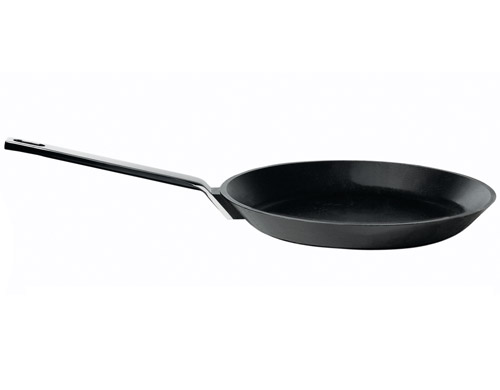
  3. A cast iron skillet. Nonstick skillets are great, but they wear horribly and have a dubious safety record. Copper and stainless steel wear great, but are temperamental, scorching and staining easily. Cast iron, on the other hand, wears like, well…iron. It distributes high and low heat great. With a little bit of use–i.e. ‘seasoning’–it can be almost as nonstick as a Teflon pan, without all the plastic bits in your food. You can clean them without water. And while enameled iron pans are nice, the bare cast iron versions are less fussy and prone to marring. I use a beautifully designed 12″ iittala Hackman Dahlström Tools for almost everything (pictured at very top. Discontinued, but available at various stores), but most any cast iron skillet work equally great. Get a size that’s big enough for the amount of cooking you do, but not so big that it takes ages to heat.
  4. A comfy couch that you can sleep on. I was at IKEA a few weeks ago and they had a 375 sq ft mock-up apartment featuring a huge, overstuffed sectional couch. I thought it a waste of space until I sat it in. Few things demarcate home like a comfy couch. In the LifeEdited apartment, the Resource Furniture Swing couch is the most used piece of furniture. A great couch can be your guest room in a pinch, and while convertible sofa-beds are great, sometimes it’s better to get a longer couch than invest in a substandard sofa-bed, which are often pretty uncomfortable.
  5. A scanner. We thought scanner technology was stable enough that it could be included on this list. Scanners are simple, can last ages, don’t require stupid, overpriced toners and, most importantly, allow you to dump tons of paper by scanning receipts and important documents. Scanners eliminate the need for a fax. You can also scan old photographs for posterity and digital display.

What would you include on this list? What items streamline your home and your life more than most? Let us know in our comments section.

Cut Paper Clutter and Future-Proof Documents

A thoughtful handwritten card is great, but most paper we deal with is just annoying, clogging filing drawers and neural pathways alike. Justin Klosky from OCD Experience gives tips how you can convert your paper clutter and create digital organization that will allow you to access documents for many years to come. 

Reduce Paper/Utilize Technology

If you have more than one filing drawer in your home and small business this applies to you!

It is time to O.C.D. (Organize & Create Discipline) and rid yourself of papers in your entire life. To prevent this tip from becoming pages of instructions, simply start going digital today. We won’t discuss the prior work you need to do, so if you don’t already have one, buy a scanner, an external hard drive and a paper shredder. It will be worth every penny.

Simply start scanning ANYTHING that you truly think you will need to reference again and shred the originals. Create a simple folder structure on your computer like you would a filing cabinet and utilize additional folders for each category you will be scanning documents for. Common folders will be: Business, Children, Health, Home, Insurance, Money/Taxes, Receipts, Resumes.

Lastly setup your external hard drive to back up your computer anytime a file has been altered and added. This will also prevent you from losing your data.

Organize: Gather all of your paper documents you want to take the time to digitize.

Create: Create a simple folder structure to store all of your digital files.

Discipline: Whenever a document comes in that needs to be scanned and filed make sure you do it daily, if not weekly. Never let something sit longer than a week or it will eventually become a chore!

Reduce Paper/Utilize Technology Tip: Only scan what you truly need in your life and shred the rest. This will eliminate paper pile ups and will allow you to live in a paperless world as effectively as possible. Keep all hard copies of certified documents.